
Z-Forensics
Detect document tampering after signing
ZaferSign connects completed digital and printed documents to their trusted original records, helping authorized reviewers verify authenticity and identify post-execution changes.
- Patented document authentication and forensic review
- Permission-controlled verification requests
- Digital and printed-document validation
- Document hashes, signer evidence, and chain of custody
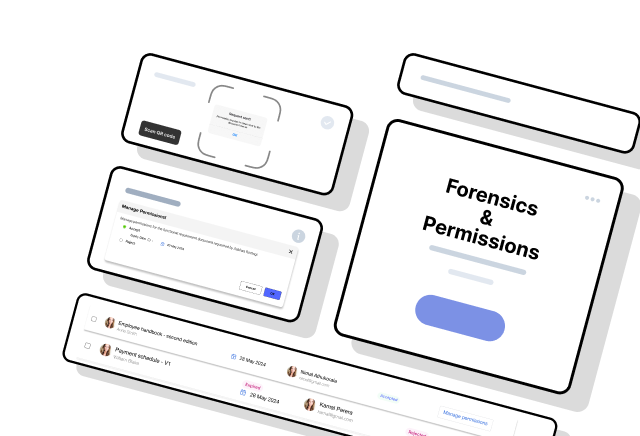
Verification stays controlled
Scan the forensic seal, request access, and compare with the trusted record after approval.
The post-execution risk
A signature does not stop a copy from being changed
The trusted record can remain intact while a downloaded, shared, scanned, or printed copy changes outside the original workflow.
Trusted record
Preserved by the workflow
Presented copy
Shared beyond the platform
Edited PDF
Content or pages may be revised after the file leaves its controlled workflow.
Detached evidence
A copy may no longer show the signer, status, and workflow context needed to trust it.
Printed or scanned copy
Visual inspection alone cannot reconnect paper to the record that can verify it.
Do not trust a copy by appearance alone. Compare it with the trusted record.
What Z-Forensics is
A patented verification layer for completed documents
Z-Forensics adds a unique forensic seal that links a completed document to its trusted original record. The seal provides a controlled route to request verification; it does not make the original document or its private evidence public.
Trusted original
Keep the completed document connected to the record produced by its controlled workflow.
Document integrity
Use document hashes and verification data to help establish whether the content still matches.
Signer and workflow evidence
Review permitted signer activity, workflow events, timestamps, and transaction context.
Chain of custody
Follow the permitted history of who handled the document and when important events occurred.
How verification works
From completed document to controlled comparison
Verification can begin after a document has moved beyond its original workflow, while access to the trusted record remains under the owner's control.
- 01
Complete
Finish the controlled document workflow and preserve its trusted record.
- 02
Seal
Add a unique Z-Forensics token that links the document to that record.
- 03
Scan
Scan the seal from a digital, scanned, or printed copy of the document.
- 04
Request
Ask the document owner for permission to perform the verification.
- 05
Authorize
The owner approves the request and controls which evidence is available.
- 06
Compare
Compare the copy with its trusted record and review any identified discrepancy.
Permission-controlled verification
Anyone can request a check. The owner controls the evidence.
A recipient who finds a document bearing a Z-Forensics seal can initiate a verification request. The document owner or authorized administrator decides whether to grant access and which evidence the requester may review.
- The seal does not expose the original record publicly
- Approval can be limited to the evidence needed for review
- Rejected requests do not reveal protected document data
Verification request
Printed agreement / ZF-2048
Requested by
External document recipient
Controlled by
Document owner or administrator
Requested evidence
- Document match
- Audit summary
- Signer evidence
No original record is exposed before approval.
Approval requiredPresented copy
Agreement.pdf
- Source
- Digital, scanned, or printed
- Forensic seal
- ZF-2048
Trusted record
Verification evidence
- Document hash
- Workflow history
- Signer evidence
Review outcome
Forensic comparison
Compare the copy with the record created by the workflow
After permission is granted, the presented copy can be reviewed against its trusted original and the evidence available to that requester. This helps establish whether the record still matches or whether a discrepancy requires investigation.
Digital and printed documents
Verification can follow the document beyond the platform
The forensic seal provides a route back to the trusted record when an eligible document is shared as a PDF, scanned, or presented in print. The same permission model protects the underlying evidence in every format.
Digital copy
Submit or scan the seal from a completed electronic document.
Scanned copy
Use the visible seal to locate the corresponding trusted record.
Printed copy
Initiate verification without relying only on visual inspection.
Patent-backed foundation
Built on patented document authentication and forensic review
The patent family describes encrypted token visualization, permission-based access, audit-trail retrieval, digital and printed-document authentication, and later forensic review of document content and metadata.
High-trust use cases
For documents whose authenticity must survive later review
Legal agreements
Check an agreement presented outside the original workflow against its trusted record.
Financial approvals
Review document state, participant activity, and approval evidence before relying on a copy.
Real estate records
Validate digital or printed transaction documents shared among multiple parties.
Government documents
Support later authenticity and chain-of-custody review for important forms and records.
Healthcare records
Keep verification access controlled when sensitive documents require authenticity checks.
Employment records
Verify completed employee documents without making the underlying evidence public.
Frequently asked questions
Understanding forensic document verification
What is Z-Forensics?
Z-Forensics is ZaferSign's patented document-verification technology for detecting post-execution tampering and fraud. It connects a completed document to its trusted record, document hashes, signer evidence, workflow history, and permitted audit information.
Does Z-Forensics stop someone from editing a PDF?
It does not prevent someone from attempting to alter a downloaded copy. It makes an altered or inconsistent copy easier to identify when the document is checked against the trusted original record and its verification evidence.
Can Z-Forensics verify printed documents?
A Z-Forensics seal can be scanned from an eligible printed or scanned copy and used to initiate verification against the corresponding trusted record.
Can anyone access the original document by scanning the seal?
No. Scanning the seal can initiate a verification request, but the document owner or an authorized administrator controls access to the original record and supporting evidence.
What happens after permission is granted?
The authorized requester can compare the document with its trusted record and review only the verification evidence made available to them, such as document integrity, status, signer activity, workflow events, or audit history.
Does ZaferSign expose documents or customer data through blockchain?
No. The ZaferSign SaaS platform does not expose complete documents, document contents, or customer data through a public blockchain. Blockchain-backed evidence uses cryptographic records, such as document hashes and transaction evidence, to support verification and auditability. Documents remain protected by ZaferSign's storage and access controls and are available only to authorized workflow participants and users explicitly granted access.
How is Z-Forensics different from a digital signature?
A digital signature supports signer identity and document integrity at signing. Z-Forensics adds a controlled way to verify a document later, including after a digital or printed copy has moved outside the original workflow.